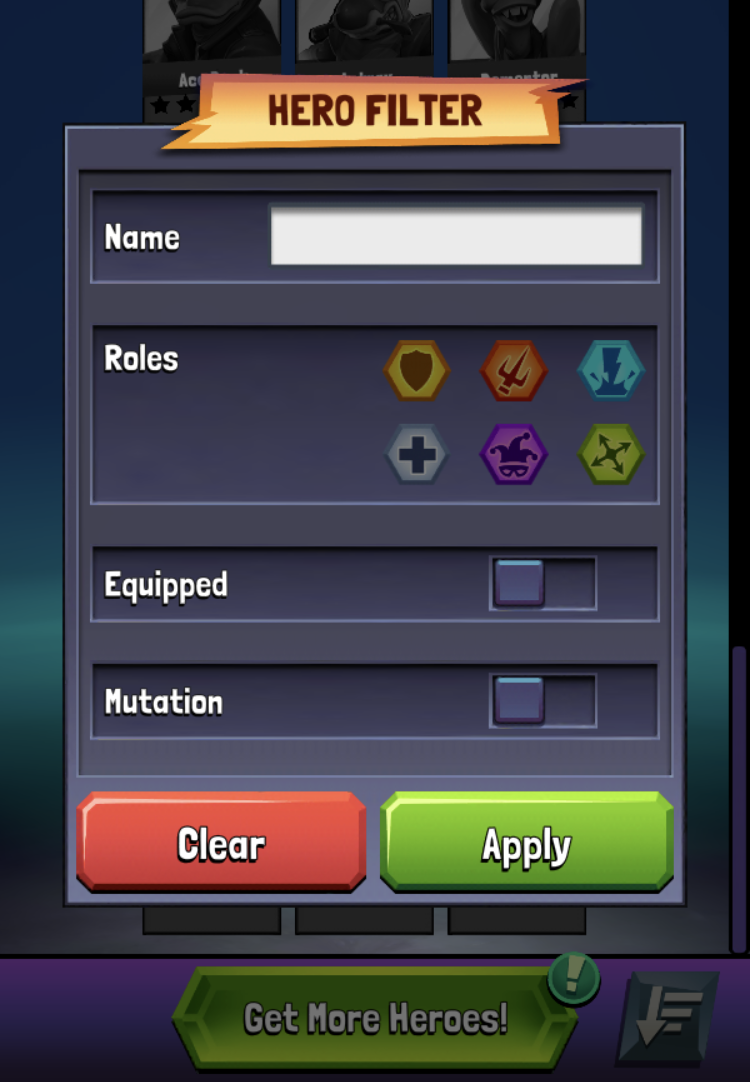
You can filter your Heroes list using the Hero Filter. Tap on the  icon to the right of the "Get More Heroes!" button at the bottom of your Heroes list to view the Hero Filter.
The icon will be blue when there are filters in use and grey when no filters are being applied.
Name
This will filter Heroes by name. You can search using a hero's full name or part of it to look them up. As an example, if you search for "Leo", you'll pull all heroes with "Leo" in their name like Leonardo and Napoleon.
Roles
This will filter heroes who have a specific Role. You can select up to 2 Roles to search by. Check the Roles article for more information about each role.
For example, if you select Tank ( ) and Trickster (
 ), you will pull all heroes that have both Tank and Trickster roles.
Equipped
Toggle the Equipped option to only show Heroes that have a piece of equipment in each equipment slot. Heroes who have no equipment or an incomplete equipment set will not be shown.
Mutation
Toggle the Mutation option to only show Heroes that are part of the current Power Mutation in Dimensional Clash.
Clear
To clear all current filters, tap "Clear" and then "Apply". It's recommended to clear filters between changing selections as well.