What is the 'offer wall and how do I find it?
The offer wall can be found in the ‘Free Gems’ section of the shop.
Use the offer wall to complete 3rd party offers that reward you with in-game gems.

Go to the Heroes > Get More Heroes > Featured > Free Gems. After a few moments, the offer wall should populate with offers available to you. If for any reason you are having difficulties locating the Offer Wall, or it is not launching correctly, please contact TMNT game support.
Tap 'IN PROGRESS' to view view offers you have already started.
All offers expire after 30 days.
What are bonus offer wall events?
 On occasion, we hold special events that reward double or triple gems earned through Offer Wall completions.
To be eligible for the bonus, you must start your offer during the promotional period but may complete it outside of the promotional period as normal. The total Gems displayed on an offer during the promotional period will already include the extra Gems from the double promotion.
How can I check the status of an I offer I viewed, started, or completed?
To view the status of all offers you have viewed or started:
1. Select the 'Free Gems' section of the shop.
2. Go to the 'In Progress' tab of the offer wall screen.
3. Tap on the offer in question.
4. The pop-up that displays next will be all information about that specific offer.
My offers have been pending/rejecting for more than 24 hours.
Offers are credited based on approval by the 3rd party provider. While an offer is in the "Pending" phase, it may or may not be approved based on whether the provider indicates all requirements have been met.
As an example, if an offer is a 30-day trial, it may not credit for several days, or at all if it's canceled instantly.
You can check the status of your offer from the 'IN PROGRESS' tab or by navigating to your Gem Status.
If an offer has been marked as 'Rejected', it usually indicates that requirements were not met, or that a duplicate submission was detected.
After 24 hours if you feel that an offer should be credited, please contact Iron Source through the Gem Status screen.
I didn't receive my gems after completing an offer.
Here are a few possible reasons for that:
- You must navigate to the offer from within TMNT: Mutant Madness. Doing so externally will not result in a credit, even if all requirements are met.
- All requirements for each offer must be met entirely.
- With offers that require a purchase or subscription; prematurely uninstalling, cancelling or refunding may cancel the offer and cause issues with subsequent offers.
- If you have attempted the same offer before, whether it be within TMNT: Mutant Madness or another game/app/website, it will not credit you a second time.
- Complete the offer when you have a strong-stable WiFi to avoid any communication issues.
If you believe you have met all requirements for an offer, but it has still not awarded you any gems, please give it at least 24 hours for the reward to show up.
Who do I contact if I still need help?
If you need help with a specific offer, we recommend that you open a customer support ticket for the specific offer. To do so, Go to the offer wall > 'IN PROGRESS' > tap the offer you're inquiring about > in the new window that opens, use the "Contact Support" link in that screen.
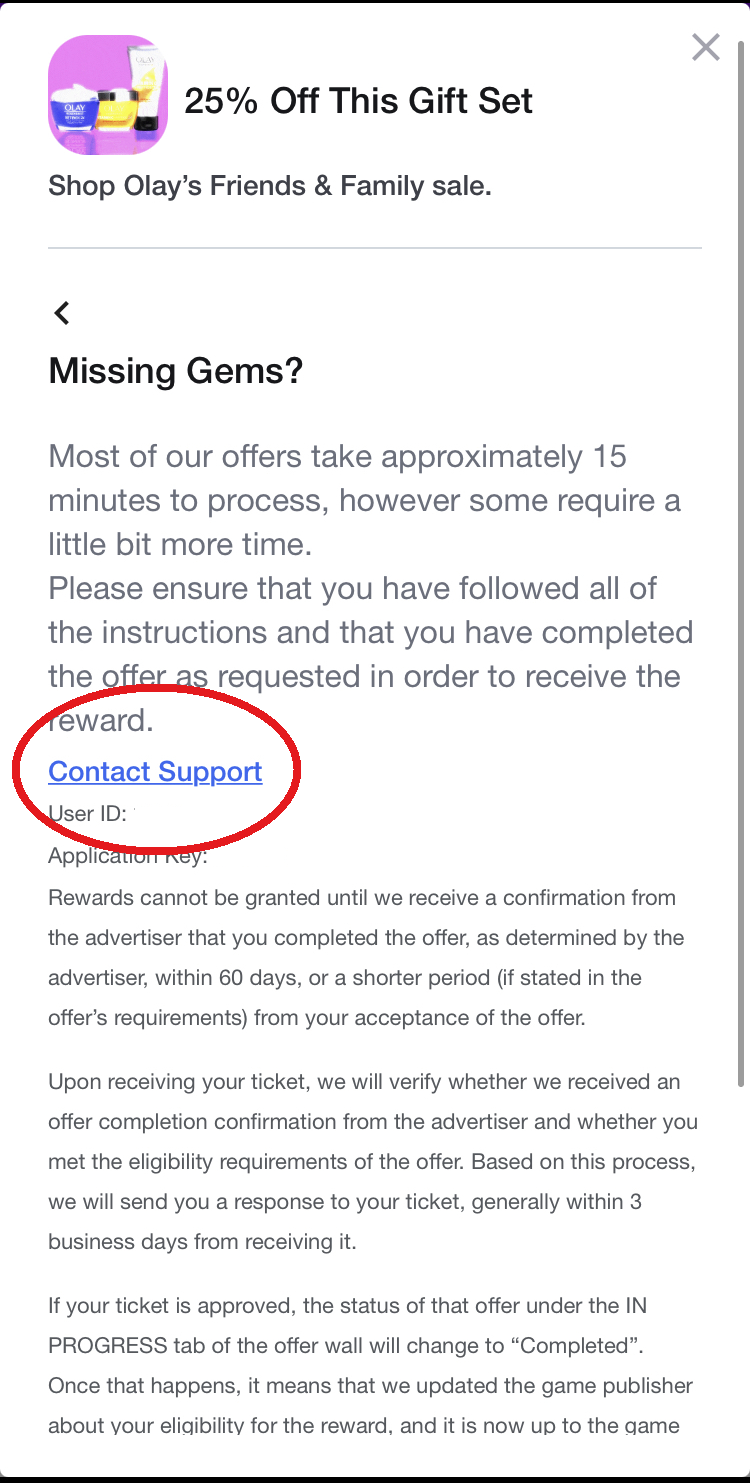
If you're having difficulty with the offer wall in general, contact IronSource support at mailto:mobile-customersupport@ironsrc.com.
The status says "Completed" but I still did not get my gems.
Offers may take some time to credit based on the type of offer. Usually relaunching the application or completing a battle can cause offers to be properly rewarded. If for any reason you do not see gems you have been awarded, please allow up to 24 hours before contacting Iron Source at mobile-customersupport@ironsrc.com.
I found a malicious, offensive or misleading offer! (Example: Free Trial not really Free)
We want to keep offers honest as possible for players and safe for a PG audience. If you encounter an offer or an ad that is suspicious, misleading, malicious, or otherwise offensive/inappropriate; please contact TMNT game support.
Please include:
- Your Player ID # (Found by Tapping the character portrait).
- Name of offer, and any relevant screenshots.
- The reason you are reporting this offer.
Iron Source has not replied to me / my offer was wrongfully denied / I still need help.
All tickets received are being looked into and answered in the order they are received-- they’ll get back to you soon!
If you feel that your offer completion was unjustly rejected or you need more help after having already worked with Iron Source, please contact TMNT game support. We will need a few things:
- Your Player ID
- Your AppKey as listed in the offer
- Details about or a screenshot of the offer
- A screenshot of your "In Progress" screen
- Receipts or other related information